 How-to
How to Track Medication Schedules: A Step-by-Step Guide
Table of Contents
- Why Tracking Your Medication Schedule Matters
- Step 1: Create Your Medication List Template
- Step 2: Choose Your Tracking Method
- Step 3: How to Organize Medications for Daily Access
- Step 4: Set Up Reminders and Notifications
- Step 5: Log Doses and Review Your Medication History
- Medication Tracking for Caregivers
- What to Do After a Missed or Late Dose
- Frequently Asked Questions
Last Updated: October 11, 2026
Why Tracking Your Medication Schedule Matters
Missing doses happens more often than most people realize. Between work deadlines, family commitments, and daily distractions, medications slip through the cracks. The consequences range from minor setbacks to serious health complications.
Learning how to track medication schedules prevents these gaps. When you document what you take and when, you stay consistent with your treatment plan. This consistency matters for chronic conditions, recovery timelines, and managing multiple prescriptions at once.
At LifeKeep, we understand that staying organized with medication isn't just about remembering, it's about building a system you'll actually use. A reliable medication tracking system removes guesswork and gives you confidence that you're taking the right doses at the right times.
Step 1: Create Your Medication List Template
Start with a clear list of every medication you take. This becomes your reference point for everything else.
Your list should include:
- Medication name (both brand and generic if applicable)
- Dosage amount
- How often you take it (daily, twice daily, as needed)
- What time of day you take it
- Any special instructions (with food, on empty stomach, avoid certain foods)
- Your prescriber's name
- Pharmacy contact information
What information to record for each medication
The more detail you capture upfront, the fewer mistakes you'll make later. Write down the exact dose, not "one pill" but "10mg" or "500mg." This matters if you switch pharmacies or need to discuss your regimen with a doctor.
Include timing information that's specific to your routine. "Morning" works for some people. Others need "7:00 AM with breakfast" because they take multiple medications and need clear sequencing.
Note any special handling. Some medications need to be taken with food. Others need to be taken on an empty stomach. Some can't be taken within two hours of other medications. These details prevent interactions and ensure your medications work as intended.
Organizing your list by dose time and frequency
Group medications by when you take them. Create sections for morning, midday, evening, and bedtime doses. Within each section, list medications in the order you'll take them.
This organization serves two purposes. First, it mirrors how you'll actually take your medications throughout the day. Second, it makes it easy to spot conflicts or overlaps that might need adjustment.
If you take medications "as needed," list those separately. Mark them clearly so you don't confuse them with your regular schedule. Include guidance on how often you can safely take them and what symptoms or situations call for them.
Step 2: Choose Your Tracking Method
You have two main paths: digital tracking or paper-based systems. The right choice depends on your lifestyle, comfort with technology, and how complex your medication schedule is.
Digital tracking with a medication reminder app
A medication reminder app sends you notifications at scheduled times. You confirm when you've taken each dose, and the app logs it automatically. This creates a complete history you can review or share with healthcare providers.
Digital apps work well if you're juggling multiple medications or complex schedules. They handle reminders so you don't have to rely on memory. Many apps sync across devices, so you can check your history anytime.
Choose an app that fits your needs. Look for one with a simple interface, something you can understand without a lengthy tutorial.
LifeKeep consolidates medication tracking alongside your other health reminders and appointments. Instead of managing separate apps for pills, doctor visits, and health tasks, you keep everything in one place.
Paper-based and pillbox methods
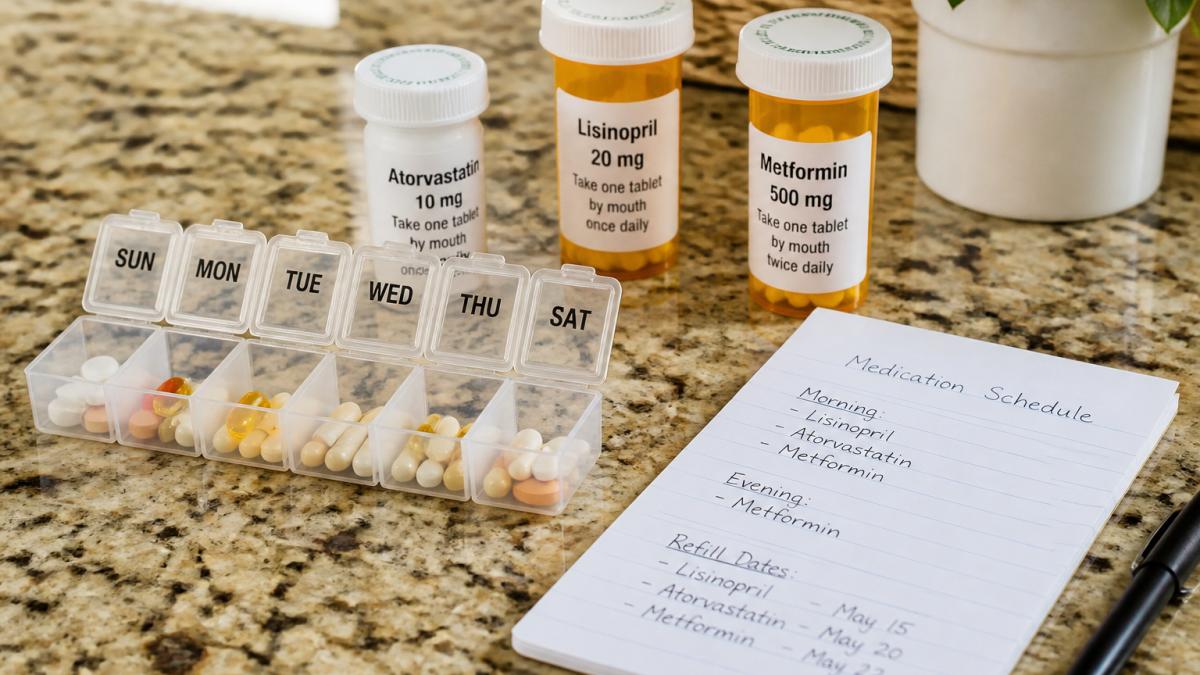
A physical pillbox and a written log work just as well as apps, especially for straightforward schedules. Fill your pillbox at the start of each week, organizing pills by day and time.
Paper systems have advantages. They don't require charging or internet access. Some people find the tactile act of checking off a box more satisfying than tapping a phone. For caregivers managing medications for multiple family members, a printed chart visible in a central location works reliably.
The trade-off is that paper systems require more active maintenance. You have to remember to fill your pillbox and manually log doses. If you travel or your routine changes, adjusting a paper system takes more effort than updating an app.
Step 3: How to Organize Medications for Daily Access
Your physical setup determines whether you'll stick with your schedule. Make taking medications as easy as possible by organizing your space thoughtfully.
Setting up your physical space
Choose a dedicated spot for your medications. This could be a shelf in your bathroom, a drawer in your bedroom, or a cabinet in your kitchen, anywhere you pass through daily. The key is consistency.
Store medications in their original bottles when possible. These bottles contain important information: dosage, expiration date, pharmacy details, and side effects. Keep bottles upright and clearly visible.
If you use a pillbox, fill it in a consistent location at a consistent time. Many people do this on Sunday evening for the week ahead.
Keep your medication list posted near your storage area. This serves as a quick reference and helps anyone assisting you understand your schedule.
Labeling and dose verification
Clear labeling prevents mistakes. Use a permanent marker to write the dose time on your pillbox compartments if they aren't pre-labeled. For example: "Mon AM," "Mon PM," "Tue AM."
Before you take a dose, verify it matches your list. Check the medication name, dosage, and time. This simple step catches errors before they happen.
If you're taking multiple medications at once, lay them out before swallowing. Count them. Make sure you have the right number of pills. This physical verification takes seconds but prevents accidental double-doses or missed medications.
Step 4: Set Up Reminders and Notifications
Reminders bridge the gap between intention and action. They catch you before you forget, especially on busy days when your routine shifts.
If you use a medication app, set notifications for each dose time.
Choose notification times that work for your lifestyle. If you're always rushing in the morning, set your reminder 15 minutes earlier so you have time to locate your medications.
For paper-based systems, set phone alarms at your dose times. Label each alarm clearly: "Morning meds," "Evening meds." When the alarm sounds, you'll know exactly what to do.
If you live with others, tell them about your medication schedule. Ask them to remind you if they notice you've skipped a dose.
Step 5: Log Doses and Review Your Medication History
Logging creates accountability and gives you data to discuss with your healthcare provider. When you document what you actually took, you build an accurate picture of your adherence.
If you use an app, logging happens automatically when you confirm a dose. Review your history weekly. Look for patterns, days when you missed doses or times when you were consistently late.
For paper systems, check off each dose as you take it. At the end of each week, count how many doses you completed. If you missed several, identify why. Were you traveling? Busy with work? Feeling unwell?
Keep your medication history for at least three months. This gives your doctor enough data to assess how well your current regimen is working. Bring your records to appointments.
Medication Tracking for Caregivers
If you're managing medications for a family member, a parent, spouse, or child, your tracking system needs to account for multiple people and potentially complex interactions.
Monitoring multiple people's schedules
Create a separate medication list for each person you care for. Use the same template so the information is consistent and easy to reference. Color-code lists by person if you're tracking several people at once.
Consider using a shared app or a visible chart that shows everyone's doses at a glance. Some caregivers use a large calendar posted in a central location with each person's name and their dose times. This prevents accidental double-doses and ensures no one is overlooked.
Set reminders for each person's dose times. If you're managing three people's medications, you might have six to ten reminders daily. Space them out so you're not overwhelmed by alerts.
Sharing access and permissions securely
If you use a digital app, check whether it allows shared access. Some apps let you add multiple caregivers to one account, each with different permission levels. One caregiver might only view history, while another can confirm doses.
Discuss privacy and security with the person whose medications you're tracking. They should understand what information is being shared and with whom. Respect their autonomy, even when you're helping, they retain control over their health data.
If you're using paper systems, store records in a secure location. Keep them accessible to authorized caregivers but protected from unauthorized access. A locked drawer or a password-protected folder works well.
What to Do After a Missed or Late Dose
Missing a dose happens. The question is how to respond without disrupting your schedule or creating new problems.
If you realize you missed a dose within a few hours, take it as soon as you remember.
If you realize you missed a dose much later, say, the next morning, skip that missed dose and resume your normal schedule.
For medications taken "as needed," a missed dose is less critical.
If you frequently miss doses at the same time, adjust how you track medication schedules or your reminder timing.
Keep a simple note of any missed doses. When you see your doctor, mention them. This information helps your provider understand whether your current regimen is realistic for your daily life and whether adjustments might help.
Staying organized with your medication schedule removes one major source of stress from your life.
LifeKeep helps you consolidate medication tracking with your other health reminders and appointments.
Frequently Asked Questions
What should I include in a medication list?
Your medication list should include the medication name, strength or dosage, how often you take it (frequency), what time of day, and why you take it. Add your doctor's name, pharmacy contact information, and any allergies or side effects you experience. For over-the-counter medications and supplements, include the same details. Keep this list accessible and update it whenever your doctor changes your prescriptions or doses.
How can I effectively track my medicines with a medication reminder app?
A medication reminder app lets you log each dose when taken, set automatic notifications at dose times, and review your medication history over weeks or months. Input your medication name, dose, and schedule once, then let the app send reminders. Mark doses as taken, skipped, or missed so you have a clear record. Many apps also let caregivers monitor compliance if needed, and some integrate with your calendar or health records for easier management.
What should I do if I miss a dose?
If you miss a dose, take it as soon as you remember unless it's almost time for your next dose. Never double up on doses. Check your medication list or ask your pharmacist about the specific instructions for each medication, as timing varies. Record the missed dose in your tracker so you and your doctor have an accurate history. If you frequently miss doses, consider setting phone reminders or using a pillbox to make the routine more automatic.
How can caregivers track someone else's medications?
Caregivers can keep a shared medication list with the person's name, all current prescriptions, doses, and frequencies. Use a centralized platform that allows secure sharing of medication schedules, or maintain a physical list kept in an accessible place. Some medication reminder apps let caregivers receive notifications when doses are taken or missed. Regular check-ins and clear communication about any schedule changes ensure the person stays on track and caregivers can monitor adherence and spot potential issues early.